Wednesday, October 23, 2013

Locket Launches A Developer Toolkit That Lets App Publishers Push Ads To Android Lockscreens


Locket, the Android app that pays you (in tiny amounts) just for unlocking your smartphone, is today launching a toolkit for app developers that will allow them to publish their own content to users’ lock screens. That means when users see ads for apps on their phone’s screen, they can open up the app itself with just a swipe, similar to how a push notification works.
Launched this summer, Locket is an early mover in the U.S. market to bring the concept of lockscreen ads to Android users. The company competes with the likes of Seoul, South Korea-based LatteScreen, which only recently began targeting the American audience with its existing product. But Locket is already seeing some traction stateside – it recently hired Charity Sabater, formerly of Candy Crush-maker King, to lead sales, and says that it has grown its footprint to roughly 300,000 users since launching just a few months ago.
The idea, for those unfamiliar, is that of an opt-in experience where Locket displays ads on the phone’s lockscreen that you can choose to engage with or not by swiping to unlock your phone. These ads, for brands, businesses, movies, apps and more, can take users to websites, Facebook Pages, coupons, or movie trailers, for example, or they can just launch the app in question, as is the case with those publishers adopting the new Locket SDK.
locket-spotifyThe company was founded in March by Yunha Kim, Paul Jang, and Christopher Crawford who were inspired to create a new market in mobile advertising for what they call “first-glance” ads. Locket serves over 10 million impressions every day, and to date, it has served over 1 billion impressions.  It’s also seeing several big-name advertisers testing its service.
More than 20 advertisers have run campaigns to date, including Hershey’s, Sunny D, Sears, ZipCar, eBay, Spotify and others, and more than 80 percent of advertisers renew with Locket. On average, the CTR on their campaigns is anywhere from 3 to 5 percent, Kim notes.
Whether or not users click through, they’re still paid. At launch, this was 1 cent per swipe, capped at 3 cents per hour. That model has now changed. Instead, users receive 1 cent for the new, unique ad of the day. Explains Kim, “if we show users 30 different ads (because people check their phone 110 times on average), they get 30 cents. Sometimes we show 20 ads (20 cents), sometimes we show 40 ads (40 cents), depending on the ad inventory we have.” In other words, Locket only makes you money when it does.
She tells us that the idea for launching the Locket SDK came from when one of the top three movie app companies reached out to the startup with a request to use a Locket SDK to publish movie ads and commercials to users’ lockscreens.
“We didn’t think about doing that at all before, but we found out that this will be a game changer for the app industry…By using our SDK, they get to have 110 chances for a single user to engage with their app,” says Kim, adding that can increase user engagement by 8x over the publishers’ current system – push notifications powered by Urban Airship.
At launch, the SDK is being adopted by five app publishers, but Locket isn’t allowed to name who, only saying that they are in “movies, entertainment, music, lifestyle as well as games.”
The SDK is also being made available for free to the top 10 apps that Locket is now working with, and Locket will continue to approve which publishers can and cannot use the SDK to serve lockscreen ads. Interested app publishers should reach out to Locket directly to learn more.

Monday, October 21, 2013

Netflix updates Android app with faster, smoother navigation


Netflix Headquarters 4
Netflix for Android is getting a much-needed tune-up. In an update that's beginning to roll out, Netflix is removing the lag and stutter that's long plagued its Android app, and turning into an appropriately snappy experience that performs as well as you'd expect. The design is also seeing a small refresh to better match Android's design guidelines, with the app's navigation bar now including a more traditional button layout. According to Android Police, which first spotted the update, the new Netflix app also works better with Chromecast, thanks to improved in-app controls and a less obtrusive interface when accessing it on the lock screen.


Android users hoping to clean up their Netflix recommendations will still have to wait, however: the app still doesn't include support for Netflix's new profiles feature, which allows individual users to have separate recommendations and queues on the same account. After launching the profiles feature over the summer, it's made its way to just about every other Netflix app, including those for the iPhone, the PlayStation 3, and the Xbox 360. But while that omission means that the app still has some room to grow, the new Netflix is still a major update that should make using it a much nicer experience all around.

Friday, October 18, 2013

Microsoft Remote Desktop apps for Android and iOS allow mobile access to stationary PCs


Microsoft Remote Desktop apps for Android and iOS allow mobile access to stationary PCs
In order to keep that office-bound PC accessible on the road, Microsoft released Remote Desktop apps for both iOS and Android alongside the arrival of Windows 8.1. Now, users can navigate a Windows machine via a smartphone or tablet with the help of the Remote Desktop Protocol (RDP). The software doesn't detect PCs automatically, so you'll need to have that IP address handy and remember to toggle on the requisite options from the base station's Control Panel. Once inside the app, you can expect multitouch navigation, content streaming and a management tool for an entire collection of remotely connected devices. Both the iOS (iOS 6 and 7) and Android (2.2 or later) versions of Microsoft Remote Desktop are free and they await in source links that follow.

Thursday, October 17, 2013

[New App] Popular Windows Anti-Malware Suite Malwarebytes Now Available On Android

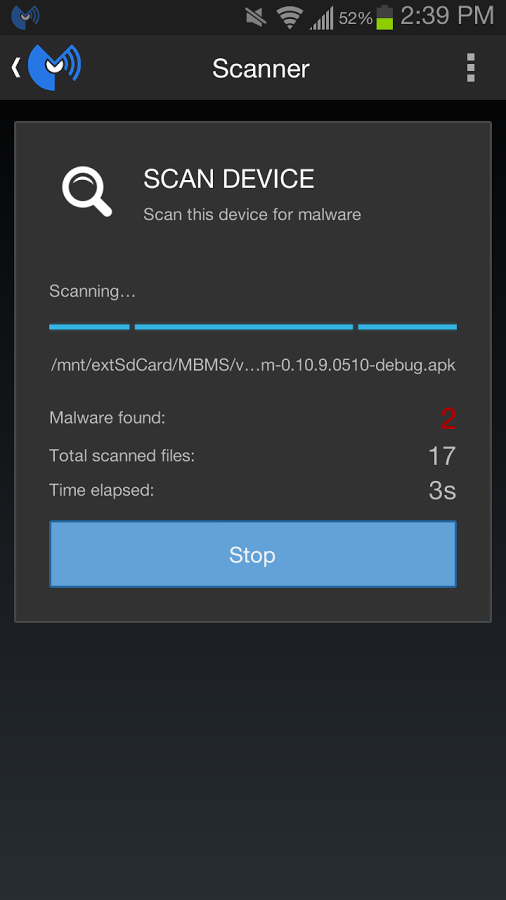
According to Google, less than one hundredth of a percent of apps out there are both malicious and capable of evading the built-in defenses in both Android and the Google Play Store. But if you really feel like you need a defense from that one-in-100,000 app, a trusted name in software protection has just entered the fray. Malwarebytes, makers of the popular eponymous Windows software, is now offering its services on Android.
unnamed (8) unnamed (10) unnamed (11)
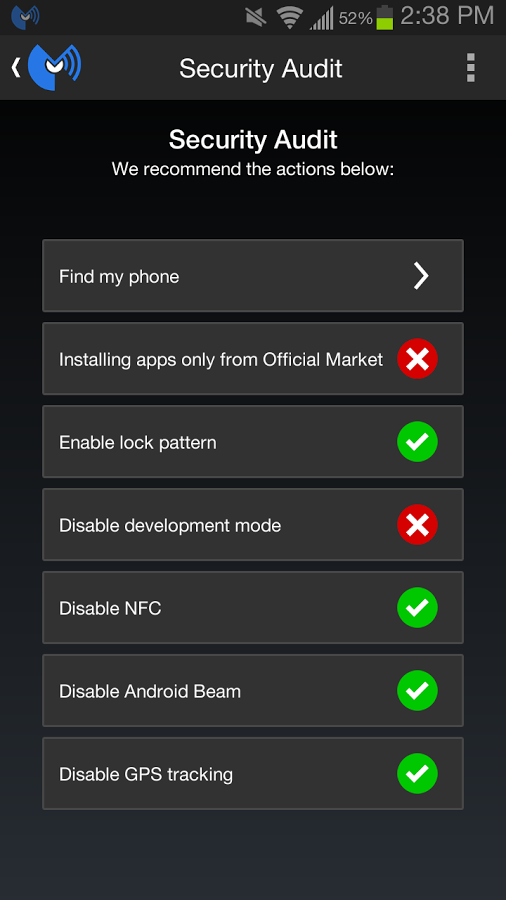
The anti-malware app works on the familiar and relatively ancient principle of a scanner paired to an updated database of naughty apps. According to the company's press release, the app actively scans for "over 200 malware families" in real-time in both apps and general files. In addition to the basic scans, Malwarebytes will give you a report of which apps have access to your personal information, and which ones are actively taking advantage of the capabilities that are outlined in Play Store permissions. If that's not enough, it also includes a Security Audit feature, which tells you about potentially unsafe features... like GPS or unsecured WiFi. Which, honestly, you can probably figure out on your own.
The icing on the cake is an application manager that displays system resource usage on a per-app basis and lets you shut them down. You know, just like the Apps section of the Android Settings menu. So yes, power users will find very little that's actually useful in Malwarebytes, but perhaps you can suggest it if you know someone who's heard about Android's "malware problem" and needs a little extra peace of mind. It's a free download for Android 2.3 or later, so at least you're not out of pocket for the experience, which is more than I can say for some other security apps.

Wednesday, October 16, 2013

Galaxy S4's Android 4.3 update leaks early, available to download

The final release is expected to be made available in the next couple of weeks.

Samsung's Galaxy S4 owners can download a near-final build of the company's Android 4.3 (Jelly Bean) distribution.
The folks over at Samsung-tracking site Sammobile on Sunday released an Android 4.3 build that's designed to run on the Galaxy S4. The near-final build can be downloaded from the Sammobile site. However, it's not clear whether (a) it's a safe download and (b) if it will cause any trouble for those who download it.

Rumors on when the Galaxy S4 will get Android 4.3 have been swirling for the past several weeks. According to Sammobile sources, who claim to have knowledge of Samsung's plans, it should be rolled out to the device's owners in the next couple of weeks.
CNET has contacted Samsung for comment on the leaked software. We will update this story when we have more information.

Tuesday, October 15, 2013

Google Play Store to optimize layout of Android apps for tablets


Google has announced layout changes coming to the Google Play Store on November 21 to optimize the Store for tablet users
In an official blog post on the Android Developers Blog, Google Play is bringing tablet optimization to the Google Play Store on Nov 21 making it easier for tablet users to find Android apps.
With the release of tablets such as the Nexus 7, the Samsung Galaxy Note 10.1, and more the Dev Blog states more than 70 million Android tablets have been activated in total.
Earlier this year, Google Play introduced the "designed for tablets" section to the Google Play Store for apps optimized for 7-inch and 10-inch tablets.
Now the Play Store will experience a series of changes in order to ease tablet users into finding the optimized apps for their tablets.
The top lists will now, by default, show the apps and games designed specifically for tablets (Top Paid, Top Free, Top Grossing, Top New Paid, Top New Free, and Trending).
The blog states, "Tablets users will still be able to switch the view so they can see all apps or games if they choose."
Additionally, the apps that are not optimized for tablets will be titled "designed for phones".
The updates are a big to encourage Android developers to take "advantage of the tremendous Android tablet opportunity."
It was reported earlier this year that the Google Play Store had surpassed Apple's App Store in app downloads.

Twitter launches Android tablet app, initially just for Galaxy Note 10.1 2014


twitter-for-android-tablets.jpg


After making a blink and miss appearance at a recent Samsung event, Twitter's tablet-optimised Android app has been officially released. However, the app is exclusive to Samsung Galaxy Note 10.1-2014 edition for now. Twitter has informed that it will be extended to other Android tablets by the end of the year.
 
While Twitter's iOS app, which is a universal one, is optimised for the iPad, the app's Android version till date offers the same interface on both tablets and phones.
 
According to a blog post by Twitter, the tablet-optimised app's landscape view offers Tweets, conversations, Trends, and accounts to follow among other features. 
 
The tweets can be expanded to see photos, videos and article previews on the right side of the screen by tapping. On further tapping, users can see photos, play videos or read links from the web in fullscreen mode.
 
The new Twitter tablet-optimised app for Android supports the Samsung tab's Multi-screen view, letting users run Twitter and another app at the same time. 
 
The Twitter Android app for the Galaxy Note 10.1-2014 also comes with a widget that displays tweets, photos, and videos in addition to country-specific breaking news, music, sports and photos. The app even offers the ability to favourite or retweet right from the widget. This feature also appears to be limited to the Samsung Galaxy Note 10.1-2014 edition.
 
Another Galaxy Note 10.1-2014 feature is the ability to doodle with the S Pen stylus that comes with the tablet.
 
The app ecosystem on Android tablets has lagged behind iOS, with most Android apps built primarily for smartphones. It's strange that a mainstream service like Twitter chose to go exclusive (at least for some time) with just one Android tablet model, thereby fragmenting its Android tablet apps. It's not the first time that this has happened, as apps like Flipboard also arrived first on Samsung's Android devices.