Monday, May 5, 2014

Android-based Pwn Phone is prepared to do evil for your network’s own good


The Pwn Phone, with its external Wi-Fi adaptor case jacked into its USB port, is prepared to do evil for your network's own good.
Mobile technology has made it possible for people to do an amazing amount with tablets and smartphones within the workplace—including hacking the living daylights out of the corporate network and other people’s devices. Pwnie Express is preparing to release a tool that will do just that. Its Pwn Phone aims to help IT departments and security professionals quickly get a handle on how vulnerable their networks are in an instant. All someone needs to do is walk around the office with a smartphone.
Pwnie Express’ Kevin Reilly gave Ars a personal walk-through of the latest Pwn Phone, the second generation of the company’s mobile penetration testing platform. While the 2012 first-generation Pwn Phone was based on the Nokia N900 and its Maemo 5 Linux-based operating system, the new phone is based on LG Nexus 5 phone hardware. However, it doesn’t exactly use Google’s vanilla Android.
“What we’ve done is taken Android 4.4 Kit Kat and recompiled the kernel,” said Reilly. “On the backend, it runs our own derivative of Kali Linux, called Pwnix. Essentially it’s running a full-blown Debian OS on the back-end of Android.“
One of the benefits of the recompiled Android kernel is that the Pwn Phone can act as a USB host, just as PCs do. That makes it possible for the Pwn Phone to use external USB adaptors for Wi-Fi, Bluetooth, and Ethernet in addition to its built-in Wi-Fi and Bluetooth adapters. The external adapters for Wi-Fi and Bluetooth extend the Pwn Phone’s attack range and capabilities, and the Ethernet adaptor allows the device to jack straight into a facility’s local wired network for additional attacks.
The result is that the Pwn Phone can handle most of the functions of bulkier, less easily concealed security testing tools at a fraction of the weight—and with even less of the potential suspicion. This new generation of the Pwn Phone (and its larger cousin, the Pwn Pad) also makes it a whole lot easier for people without a great deal of penetration testing experience to quickly get up to speed and dig into potential vulnerabilities. Using the new Pwn devices can quickly convince you that it's important to turn Wi-Fi off on your phone when you’re in a public place.
The Pwn Phone comes with a total of 103 network monitoring and attack tools loaded, 26 of which have been configured for launch by touch from the device’s home screen. While all the tools run in a terminal window and have a character-based interface upon launch, some of the 26 touch-optimized tools require just one touch to execute. Others have been given menu-driven interfaces to reduce the amount of thumb-typing required to launch them effectively.
One of those “one-touch” penetration testing tools is EvilAP, a tool for creating a “malicious” Wi-Fi access point that can detect and respond to the Wi-Fi probe requests sent by devices as they look for previously used wireless access points. EvilAP can use the phone’s wireless broadband connection or another network to then pass through network requests while the phone’s user launches other attacks on the traffic. (These can include SSL Strip “man-in-the-middle” attacks against secure Web sessions.)
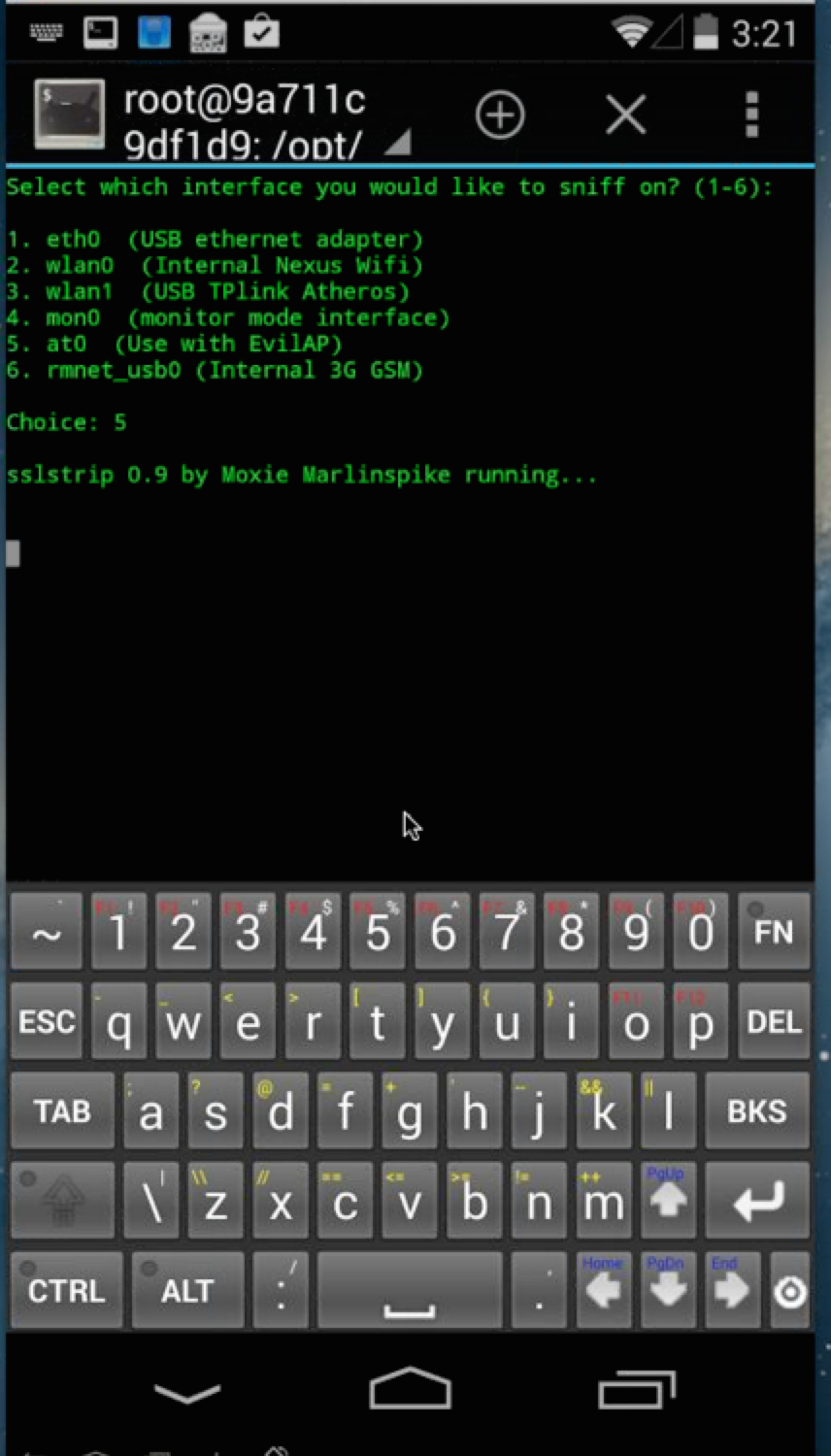
SSL Strip running on the Pwn Phone.
Other tools in the touch collection include: the network mapping tool Nmap; Strings Watch (a tool that watches for text within packets); the Tshark and Tcpdump packet analysis tools; the Metasploit and dSploit penetration testing toolkits; and the Kismet and Airodump wireless network monitoring tools.
Of course, if you’d rather not do any thumb typing at all while wandering around a targeted area for stealth purposes, a good portion of Pwn Phone's functionality can be controlled remotely. Just as with Pwnie Express’ other penetration hardware, the Pwn Phone can be configured using Web-based administration tools over one of the six covert channels provided in the phone’s toolset to connect through the network being tested or through its wireless broadband connection. And a remote terminal session to the phone can be opened via a reverse-SSH connection back to a PC. That means security surveys can be done without the Pwn Phone-carrying foot soldier ever pulling the phone out of his or her pocket. A remote security pro can even handle the whole show without leaving home.
Data collected by the tools—such as logs for packet captures from Tshark (the text-based version of the WireShark packet capture tool) and captured text from the Strings Watch packet monitoring tool—are stored in the phone’s 32 gigabytes of local storage. If you need to make all the data go away quickly, there’s a one-touch application that restores the phone to factory settings. It'll wipe away any sign that the phone might have been up to no good.
These are all capabilities that Pwnie Express already offers in a slightly larger form factor: the Pwn Pad 2014, based on Google’s Nexus 7 tablet and Android 4.2 (“Jelly Bean”). The only real difference between the Pwn Phone and the Pwn Pad is form factor and price. The Pwn Phone will sell for around $1,295, while the Pwn Pad is priced at $1,095. Of course, if you’d rather piece together your own Pwn Phone on an existing Nexus 5, there will eventually be a community version of the software available for download.

Sunday, May 4, 2014

Google Drive for Android Update Prompts Users to Install Docs, Sheets Apps

google_drive_logo_official.jpg

Google recently announced standalone offline document editing apps - Docs, Sheets, and Slides - for both Android and iOS platforms. While the Docs and Sheets apps have already been released, the Slides app is expected soon.


As mentioned by Google at the announcement of the Docs, Sheets, and Slides apps, the Google Drive app will do away with the ability to edit documents and sheets within the app itself. Android Police, which has made available a signed apk for the updated Google Drive v1.3 available for download, reports that the new Google Drive update will now prompt users to install the standalone apps for Docs and Sheets when users try to edit the relevant documents.

However, the report notes that once both the Docs and Sheets apps have been installed on an Android device, the Drive app works as it ever was. The new update for Google Drive app for Android is yet to be rolled out; however, the report claims that it might be out by this week.

Other features that the new Google Drive app for Android update (v1.3) brings include re-arranged slide-out navigation panel with settings link; automatically uses Docs and Sheets apps in Drive (once standalone apps installed), and new file button and refresh button in overflow menu.

In addition, the Mountain View giant has updated its Google Drive for iOS with an optional passcode lock. It's worth noting that the new passcode feature is yet to be released for Google Drive app for Android.

Further, the Drive app's App Store listing notes that, "The latest version of the Drive app works seamlessly with the new Docs and Sheets apps." The new update, much like Android strips the ability to edit documents and spreadsheets. The latest version of Google Drive is now available in App Store and also brings few bug fixes and performance improvements.
Earlier, Google lowered the prices of paid plans of its Drive cloud storage service. Notably, the new Google Drive storage prices were way below what OneDrive and Dropbox charge.

Saturday, May 3, 2014

Nokia HERE apps for Android and iOS

There's strong evidence to believe that Nokia plans on releasing their collection of HERE apps for Android and iOS.
The Finnish company released two job postings that call for mobile software engineers who have experience in iOS and Android application development. Check out the postings below:
“As an Android / iOS developer you will be a key member of our growing mobile engineering team, developing industry-leading mobile SDKs / applications. This is an experienced position that requires fluency in the latest Java capabilities and improvements in the Android and iOS  SDK. The ideal candidate is motivated to explore and deliver the best possible solutions to our customers
The ideal candidate will have experience shipping one or more Android / iOS apps, currently on Google Play / Apple Store. You should have a strong passion for technology as evidenced by your personal projects that demonstrate your aptitude for superior engineering and strong customer-centric product sense. You should enjoy working outside the comfort zone and love to learn new technologies. The position will be based in Berlin / Frankfurt and will report to the Tem Lead Development team Mobile SKDs for Business, HERE Platform for Business.”


There's also a second job posting that calls for a specific Android mobile developer:
“We are now looking for a Mobile App Developer (Android) to join our team.
In this role, you will be responsible for:
•Working directly with developers, product management and UX Design to conceptualize, build, test and deliver mobile products
•Deliver across the entire app life cycle –concept, design, build, deploy, test, release to app stores and support
•Build prototypes at tech scoping stage of projects
•Working along the web developers to create and maintain a robust framework to support the apps
•Working with the front end developers to build the interface with focus on usability features
•Keep up to date on the latest industry trends in the mobile technologies
•Explain technologies and solutions to technical and non-technical stakeholders”
From the two job descriptions, it seems that Nokia plans on bringing the entire HERE experience to both Android and iOS, and not just their navigation and maps software. This is a smart move on Nokia's part, as the more users they're able to get invested in their services, the more prominent their brand will be in the eyes of consumers; a very Google-esque strategy.

Friday, May 2, 2014

Best expense tracking apps for iPhone, Android, and Windows Phone


Work expenses


Back in my day in the corporate world, one of the most dreaded tasks was preparing the monthly expense report. Even though it meant getting reimbursed for out-of-pocket expenditures made in the course of the job, finding those little receipts and getting them into the report was a chore.


After leaving the corporate world and opening my consultancy, that task didn't lessen in importance. Although I was no longer getting reimbursed for those expenses, Uncle Sam still needed the receipts to let me claim them as legitimate expenses.
Things are different now with smartphone apps that turn this chore into a bit of fun. Little paper receipts can go in a shoe box after snapping a photo of them with the phone. Expense tracking apps snap the photo, then read the receipt for building a proper entry into the accumulative database. No muss, no fuss.
The following expense tracking apps are the best of the lot for the iPhone, Android, and Windows Phone.
Expensify for iPhone (also available for Android)
Expensify iPhone
Expensify for iPhone
This free app handles all aspects of expense tracking on the iPhone. An image of a receipt can be snapped in the app as expected, and expenses can be imported from bank statements online. Expense entries can be automatically entered by forwarding copies of emailed receipts to the user's Expensify online account.
Expense reports can be emailed or output in PDF for submission. Expensify can also work with a wide range of financial systems for businesses.
One Touch Expenser for Android

One Touch Expenser
One Touch Expenser for Android
As the title indicates, snap an image of the receipt to record and use it to fill out the item details later. The app is a lightweight finances manager, but can be used as an expense tracker with all of the expected features except one.
This app doesn't interpret photos of receipts. When a photo of a receipt is taken in the app, it sets a reminder to enter the details from the photo at a specified time and date. This eliminates the need to keep the paper receipt.
Trip Expenses for Windows Phone

Trip Expenses
Trip Expenses for Windows Phone
This app makes great use of the Windows Phone interface to enter and track expenses. Like the other apps in this collection, entering an expense on the fly can be as simple as snapping a picture of the receipt.
Expenses can be entered with multiple currencies, a boon for international travelers.You can track expenses on a daily basis, and group those made on a trip for reporting purposes. Expense reports can be emailed to others for approval.

Thursday, May 1, 2014

Facebook Messenger 5.0 for Android brings improved sharing and more

facebook_messenger_update_v5_official_google_play.jpg


Facebook has started rolling out an update for its Facebook Messenger app, which brings the app version 4.0 to version 5.0 for Android users.

In the latest v5.0 update for the Facebook Messenger app, the app retains the look and overall design seen in the previous version. However, the update lets users send images, videos and voice messages in an easier manner.

Additionally, users can send videos from their smartphone's gallery, and play them right in the Facebook Messenger app (requires Android 4.3 and above for now, though Facebook says it will bring this feature to more phones). Users can also take photos via the Facebook Messenger app, and share them right after clicking them.

Also added to Facebook Messenger v5.0 for Android are stickers shortcuts, which guides users to the relevant sticker packs when they receive a new sticker from a friend. A new row of icons is also available, for quick access to functions such as inserting stickers and other media. Last in the list of updates is improved search, providing a dialog box to find people and groups.

The updated Facebook Messenger app is available to download from the Google Play store.
The iOS users got the same version 5.0 update for Facebook Messenger on Monday. The official changelog notes that the Facebook Messenger app (version 5.0) for iOS adds video sharing, which now allows users to play the shared videos in the app itself; instant photo sharing, which offers the option to send a clicked image with just one tap in the app; improved search, which will add quick search of people and groups, as well as other fixes including stickers and groups.

The Facebook Messenger app (version 5.0) for iOS now shows a single row of icons for clicking images, selecting an image or video from Camera Roll; choosing a sticker and voice messages below text entry field to include in user's conversation. Further, the new version adds ability to download, by pressing and holding, a sticker pack received from someone. The update was released on Monday and is now available on the App Store (36.8MB in size).

Tuesday, April 29, 2014

This awesome app lets you share your iOS screen with Android devices

Slingshot iOS, Mac, Windows and Android


AirSquirrels, creator of popular apps AirParrot and Reflector, on Thursday launched an interesting new application that works on a variety of platforms and lets users share their app screens, but also other documents and files, with others. Called Slingshot, the app will make it very easy for iPhone and iPad users to share apps and documents with iOS, Mac, Windows and Android users.
“Share screens, documents and video streams from anywhere there’s a wireless connection,” the company wrote on its website. “Slingshot provides mobile access for users with iOS or Android devices, and it works on both Windows and Mac. Host and join from any device, and present your screen even when you’re on the go. Slingshot takes teamwork and collaboration to the next level, bringing together the devices we use every day.”
The app can be used simply to share screens or documents, but also for teaching or demo purposes. Slingshot sessions also support note-taking and HD video chat. Users will also be able to mirror a specific application, in order to demo it to an audience in a training session for example, while using a different app on their devices at the same time.
Slingshot comes with a 30-day free trial period, after which it requires a subscription to work. Pricing starts at $9.99 per month and goes all the way up to $99.99 per month, depending on how many users need to be supported for Slingshot sessions.

Monday, April 28, 2014

Samsung Galaxy Note 2 Receives Android 4.4 Kitkat Update Ahead of Galaxy S3

Number of Galaxy S5 units shipped with non-working cameras small: Samsung
Samsung Galaxy Note 2 started receiving the Android 4.4 Kitkat OS update while the Galaxy S3 users were still waiting in vain. 
The South Korean tech company started rolling out Android 4.4 KitKat update for its second generation Galaxy Note smartphone. Users in Europe will be the first to get the taste of the chocolatey mobile software, most specifically in France. The update will then roll out to different parts of Europe.
According to SamMobile, the new firmware brings a number of enhancements included in the latest version of Google's platform, as well as many Samsung-made improvements and tweaks. Some of the noticeable changes in the smartphone-tablet hybrid are full-screen album art, camera shortcut on the lock screen, wireless printing support, NFC tap-to-pay, options to set default messaging and launcher apps and better stability. There's also Samsung KNOX support to enable more secure communication and Samsung Wallet.
Previous reports claimed that Samsung Galaxy Note 2 Android 4.4.2 Kitkat OS update will roll out in May. Android Origin stated that not all Samsung Galaxy Note 2 models will receive an update.
Some of the Samsung Galaxy Note 2 models that will receive the Android 4.4.2 Kitkat OS update are: International GT-N7100, China Unicom Gt-N7102, International GT-N7105, China Mobile GT-N7108, Verizon SCH-i605, US Cellular SCH-R950, AT&T SGH-i317, Bell, Rogers, SaskTel and Telus SGH-i317M, T-Mobile SGH-T889, Mobilicity, Videotron and WIND SGH-T889V, Sprint SPH-L900, China Telecom SCH-N719, NTT DoCoMo SGH-N025, KT SHV-E250K, LG U+ SHV-E250L, and SK Telecom SHV-E250S.
However, the roll out will be gradual as Samsung will have to send the 4.4.2 Kitkat update to carriers for certification, which may take quite a while and will be dependent on carrier's own speed of roll out. Thus, it is expected that not all devices will have the update by the end of May and it could take months.
Meanwhile, Samsung Galaxy Note 2 users can manually check their devices if the said update is already available. Go to Settings > About Phone and see if you have a notification for OS update.